
3,086 words, 16 minutes read time.
Introduction: The Foundation of Modern SharePoint Development
Let’s cut straight to the chase, gentlemen. If you’ve been in the trenches with SharePoint development, you know the pain of the old deployment models. Remember those sleepless nights wrestling with farm solutions and sandboxed code? Those days when deploying a simple web part felt like trying to change a tire while the car was still moving? Microsoft finally threw us a lifeline with the SharePoint Framework (SPFx), and it’s built on a class-based architecture that deserves your attention.
The decision to use classes as entry points for SPFx web parts wasn’t made lightly. It’s a deliberate architectural choice that impacts how we build, maintain, and scale our SharePoint customizations. As developers who take pride in crafting efficient, maintainable code, understanding this foundation is crucial. It’s like knowing why your car’s engine block is cast iron instead of aluminum—the underlying design decisions affect everything you’ll do with it.
Today, we’re diving deep into why the SPFx generator creates a class for the entry point into web parts. This isn’t just academic knowledge—it’s practical wisdom that will make you a more effective SharePoint developer. Whether you’re building solutions for clients or enhancing your company’s intranet, mastering this concept will give you an edge that separates the professionals from the amateurs.
The SharePoint Framework Architecture: Built for Modern Challenges
Before we dissect the class structure, let’s understand what we’re working with. The SharePoint Framework isn’t just another Microsoft development model—it’s a complete paradigm shift designed to address the shortcomings of previous approaches. It’s like Microsoft finally admitted that their old toolbox wasn’t cutting it and built something that actually works in today’s web environment.
At its core, SPFx embraces modern web development practices. It leverages open-source tooling like Node.js, Yeoman, Gulp, and webpack—tools that real developers use in the wild, not just Microsoft-specific technologies. This shift acknowledges that SharePoint development needed to join the mainstream web development ecosystem rather than remain in its own isolated world.
The component model in SPFx is designed around reusability, isolation, and modern rendering techniques. Unlike the server-side rendering of traditional SharePoint web parts, SPFx components run entirely in the browser, communicating with SharePoint through its REST APIs and client-side object model. This client-side execution model provides better performance and user experience while giving developers more flexibility.
Think of SPFx as the modern chassis upon which you’ll build your SharePoint customizations. It’s engineered to handle the demands of contemporary web applications while still integrating seamlessly with SharePoint’s infrastructure. And at the heart of this architecture is the class-based component model that we’re exploring today.
Object-Oriented Programming in the Browser: The Class Decision
When Microsoft’s engineers were designing SPFx, they faced a critical decision: how should developers structure their code? They could have gone with a purely functional approach, using simple JavaScript functions as entry points. Instead, they chose classes—a decision that reflects both the capabilities of modern JavaScript/TypeScript and the complex requirements of SharePoint web parts.
Classes provide a natural way to encapsulate related functionality and state. In the context of a web part, this means keeping together the rendering logic, property settings, configuration options, and lifecycle methods. It’s like having all your tools organized in a well-designed toolbox rather than scattered across your workbench.
TypeScript enhances this class-based approach by adding strong typing, interfaces, and improved tooling support. When you’re working on complex SharePoint solutions, these features aren’t just nice-to-haves—they’re essential for maintaining code quality and developer sanity. The static type checking catches errors before they make it to runtime, saving you from those embarrassing moments when your web part crashes in front of a client or your boss.
Here’s what a basic SPFx web part class looks like:
export default class HelloWorldWebPart extends BaseClientSideWebPart<IHelloWorldWebPartProps> {

  private _isDarkTheme: boolean = false;
  private _environmentMessage: string = '';

  protected onInit(): Promise<void> {
    this._environmentMessage = this._getEnvironmentMessage();
    return super.onInit();
  }

  public render(): void {
    const element: React.ReactElement<IHelloWorldProps> = React.createElement(
      HelloWorld,
      {
        description: this.properties.description,
        isDarkTheme: this._isDarkTheme,
        environmentMessage: this._environmentMessage,
        hasTeamsContext: !!this.context.sdks.microsoftTeams,
        userDisplayName: this.context.pageContext.user.displayName
      }
    );

    ReactDom.render(element, this.domElement);
  }

  // Additional lifecycle methods and property pane configuration...
}
This class-based structure gives you a clear entry point and a predictable set of methods to override. It’s like the difference between a custom-built workbench with designated places for each tool versus just throwing everything on a table. The organization makes complex tasks manageable.
The Anatomy of an SPFx Web Part Class: Breaking Down the Beast
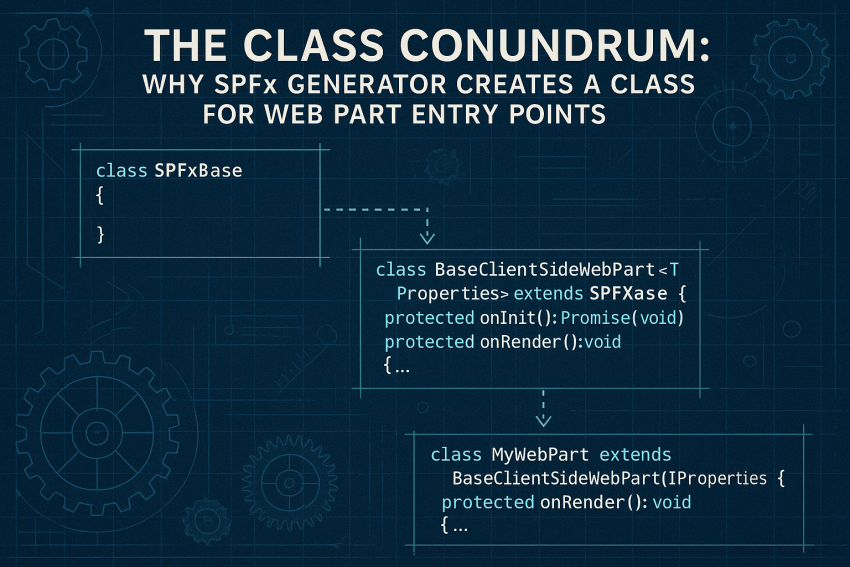
Let’s roll up our sleeves and look under the hood at what makes these classes tick. Every SPFx web part class extends BaseClientSideWebPart<T>, which provides the foundation for all web parts in the framework. This inheritance pattern is crucial—it gives your web part access to the SharePoint context, lifecycle methods, and property pane functionality without you having to implement these features from scratch.
The generic type parameter T represents your web part’s properties interface, which defines the configuration options available to users. This strong typing ensures that you can’t accidentally use a property that doesn’t exist or assign it an incompatible value. It’s like having a blueprint that prevents you from installing the wrong parts in your engine.
The lifecycle methods in an SPFx web part class give you hooks into different stages of the component’s existence:
onInit(): Called when the web part is first initialized, perfect for setup tasksrender(): Where you generate the web part’s HTML or React componentsonDispose(): Your chance to clean up resources when the web part is removedonPropertyPaneConfigurationStart(): Triggered when the property pane opensonPropertyPaneFieldChanged(): Responds to user changes in the property pane
These methods provide a structured way to manage your web part’s behavior throughout its lifecycle. It’s similar to knowing exactly when to change your oil, rotate your tires, or perform other maintenance on your vehicle—the framework tells you when each action should occur.
The property pane configuration is another area where the class structure shines. By implementing the getPropertyPaneConfiguration() method, you define the UI controls that appear in the property pane when users configure your web part. This encapsulation keeps all aspects of your web part—from rendering to configuration—in one cohesive unit.
The Power Play: Benefits of the Class Structure in SPFx
Now that we understand the structure, let’s talk about why this approach gives you an advantage in real-world development scenarios. The class-based architecture of SPFx web parts offers several concrete benefits that directly impact your effectiveness as a developer.
First, state management becomes more intuitive. Class properties provide a natural place to store the state that your web part needs to function. Need to track whether data is loading? Create a property. Need to cache API responses? Create another property. This approach is straightforward and doesn’t require additional libraries or patterns for simple state management.
Encapsulation is another major win. Your web part’s internal workings—private methods, helper functions, and implementation details—can be hidden from the outside world, exposing only the interfaces that other components should interact with. This is crucial for building maintainable systems, especially in larger projects where multiple developers might be working on different parts of the solution.
The inheritance capabilities of classes also enable powerful extensibility scenarios. Need to create several web parts with shared functionality? You can create a base class that extends the SPFx base class, add your common features, and then have your specific web parts inherit from your custom base. This approach reduces duplication and promotes consistency across your solution.
Consider this real-world example of extending a base class for multiple related web parts:
// Base class for all dashboard web parts
export abstract class BaseDashboardWebPart extends BaseClientSideWebPart<IDashboardWebPartProps> {
  protected _dataService: DataService;

  protected onInit(): Promise<void> {
    this._dataService = new DataService(this.context);
    return super.onInit();
  }

  protected abstract renderDashboardContent(): JSX.Element;

  public render(): void {
    const element: React.ReactElement<IDashboardContainerProps> = React.createElement(
      DashboardContainer,
      {
        title: this.properties.title,
        content: this.renderDashboardContent()
      }
    );

    ReactDom.render(element, this.domElement);
  }

  // Shared property pane configuration and other common functionality
}

// Specific implementation for a sales dashboard
export default class SalesDashboardWebPart extends BaseDashboardWebPart {
  protected renderDashboardContent(): JSX.Element {
    return React.createElement(
      SalesDashboardContent,
      {
        dataService: this._dataService,
        region: this.properties.region
      }
    );
  }

  // Sales-specific functionality
}
This pattern allows you to build a family of related web parts that share common infrastructure while varying in their specific implementations. It’s like having a platform chassis that can be configured for different vehicle types—the core remains the same, but the specializations make each one unique.
Getting Your Hands Dirty: Real-World Implementation
Theory is fine, but we’re practical men who need to see how things work in the real world. Let’s walk through a typical implementation scenario to see how the class structure facilitates effective development.
Imagine you’re building a company news web part that displays the latest announcements from a SharePoint list. You need to fetch data, handle loading states, render the content, and allow users to configure display options. Here’s how the class structure helps you organize this functionality:
                PropertyPaneToggle('enableAnalytics', {
                  label: "Enable Analytics Tracking"
                })
              ]
            }
          ]
        }
      ]
    };
  }

  protected onPropertyPaneFieldChanged(propertyPath: string): void {
    // If the data source properties change, reload the items
    if (propertyPath === 'listName' || propertyPath === 'maxItems') {
      this._isLoading = true;
      this.render();

      this._loadItems()
        .then(() => {
          this._isLoading = false;
          this.render();
        })
        .catch(err => {
          this._error = `Failed to load news items: ${err.message}`;
          this._isLoading = false;
          this.render();
        });
    }
  }

  protected onDispose(): void {
    ReactDom.unmountComponentAtNode(this.domElement);
  }
}
This example demonstrates how the class structure provides natural homes for different aspects of your web part’s functionality. Private properties store state, private methods handle internal logic, and the inherited lifecycle methods hook into the framework’s execution flow. It’s like a well-designed engine where each component has its place and purpose.
One of the most powerful patterns in SPFx development is the separation of concerns between the web part class and the React components it renders. The web part class handles initialization, configuration, and data fetching, while React components focus on rendering the UI. This division of labor keeps your code clean and maintainable, like having specialized tools for different jobs rather than one multi-purpose tool that does everything poorly.
Performance is another area where the class structure helps. By initializing services and loading data in the onInit() method, you ensure that expensive operations happen only once during the web part’s lifecycle. The class properties then cache the results, preventing unnecessary reloads when the web part re-renders. It’s like tuning your engine for maximum efficiency—you get better performance without additional effort.
The Modern Debate: Classes vs. Functional Approaches
Now, I know what some of you are thinking. “Classes? Aren’t functional components the hot thing now?” You’re not wrong to ask. The web development world has been shifting toward functional programming patterns, especially with React’s introduction of hooks. This has created an interesting tension in SPFx development.
The SPFx generator still creates class-based web parts because that’s the foundation of the framework. However, the components you render within those web parts can absolutely be functional components using hooks. This creates a hybrid approach that leverages the strengths of both paradigms.
The class-based web part provides the structured entry point, lifecycle management, and property pane integration that SPFx requires. Meanwhile, your React components can use all the modern patterns like hooks, context, and memo. It’s like having a traditional engine block with modern fuel injection and electronic systems—combining proven reliability with cutting-edge performance.
Here’s how you might use a functional component within your class-based web part:
// Your SPFx web part class
export default class ModernApproachWebPart extends BaseClientSideWebPart<IModernApproachWebPartProps> {
  public render(): void {
    const element: React.ReactElement = React.createElement(
      ModernComponent,
      {
        description: this.properties.description,
        context: this.context,
        updateProperty: (key: string, value: any) => {
          this.properties[key] = value;
          this.render();
        }
      }
    );

    ReactDom.render(element, this.domElement);
  }

  // Other web part methods...
}

// Your functional component with hooks
const ModernComponent: React.FC<IModernComponentProps> = (props) => {
  const [data, setData] = useState<IDataItem[]>([]);
  const [loading, setLoading] = useState<boolean>(true);

  useEffect(() => {
    // Fetch data when component mounts
    const fetchData = async () => {
      try {
        const service = new DataService(props.context);
        const items = await service.getItems();
        setData(items);
        setLoading(false);
      } catch (error) {
        console.error("Failed to fetch data:", error);
        setLoading(false);
      }
    };

    fetchData();
  }, [props.context]);

  // Render UI based on state
  if (loading) {
    return <div>Loading data...</div>;
  }

  return (
    <div>
      <h2>{props.description}</h2>
      <div className="items-container">
        {data.map(item => (
          <div key={item.id} className="item-card">
            <h3>{item.title}</h3>
            <p>{item.description}</p>
            <button onClick={() => props.updateProperty('selectedItem', item.id)}>
              Select
            </button>
          </div>
        ))}
      </div>
    </div>
  );
};
This hybrid approach gives you the best of both worlds. The class handles the SPFx integration, while the functional component uses modern React patterns for UI rendering and local state management. It’s like having a classic muscle car chassis with a modern drivetrain—respecting tradition while embracing innovation.
Microsoft is aware of this tension and has been gradually evolving the SPFx framework. While they haven’t abandoned the class-based entry point, they’ve made it easier to use modern React patterns within that structure. This pragmatic approach acknowledges both the need for stability in the framework’s core and the benefits of newer development patterns.
Mastering the Class: Best Practices for SPFx Development
Now that we understand why SPFx uses classes and how they work, let’s talk about how to use them effectively. These best practices will help you leverage the class structure to build robust, maintainable SharePoint solutions.
First, embrace the separation of concerns. Your web part class should focus on initialization, configuration, and data orchestration, while delegating UI rendering to React components. This keeps your code organized and makes it easier to test and maintain. It’s like keeping your engine components separate from your interior design—each can be optimized for its specific purpose.
Second, leverage private methods and properties for internal implementation details. This encapsulation prevents other parts of your code from depending on implementation specifics that might change. Only expose what truly needs to be public. It’s similar to how a car manufacturer shields you from engine complexity with a simple interface—the steering wheel, pedals, and dashboard are all you need to interact with.
Third, use inheritance judiciously. While it’s tempting to create deep inheritance hierarchies, this can lead to code that’s difficult to understand and maintain. Instead, focus on shallow inheritance with clear responsibilities at each level. A base class for common functionality and specific implementations for different web parts is usually sufficient. Think of it like vehicle platforms—a common base with specific models built on top, rather than endless specialization.
Fourth, take advantage of TypeScript’s type system. Define interfaces for your properties, method parameters, and return values. This not only catches errors early but also serves as documentation for future developers (including your future self). It’s like having detailed specifications for each component in your system—you know exactly what fits where.
Here’s an example of well-structured TypeScript interfaces for a web part:
// Define the shape of your data
export interface INewsItem {
  id: string;
  title: string;
  description: string;
  publishedDate: Date;
  author: string;
  imageUrl?: string;
  url: string;
}

// Define the web part properties
export interface INewsWebPartProps {
  listName: string;
  maxItems: number;
  showImages: boolean;
  showDate: boolean;
  showAuthor: boolean;
  enableAnalytics: boolean;
  cacheTimeMinutes: number;
}

// Define props for your React component
export interface INewsDisplayProps {
  items: INewsItem[];
  isLoading: boolean;
  error: string | null;
  showImages: boolean;
  showDate: boolean;
  showAuthor: boolean;
  onItemClick: (item: INewsItem) => void;
}
These interfaces create a contract that makes your code more predictable and easier to work with. They’re like the specifications that ensure parts from different manufacturers will work together in your engine.
Finally, consider performance from the start. Initialize expensive resources once during onInit(), implement caching where appropriate, and be mindful of re-rendering performance. The class structure gives you hooks to implement these optimizations naturally. It’s like building performance considerations into your engine design rather than trying to tune a poorly designed engine later.
Looking Forward: The Evolution of SPFx Development
As we wrap up our deep dive into SPFx’s class-based architecture, let’s look ahead to what the future might hold. Microsoft continues to evolve the SharePoint Framework, and understanding its foundations will help you adapt to whatever changes come next.
The tension between class-based and functional approaches is likely to continue. Microsoft has shown a commitment to supporting modern development patterns while maintaining backward compatibility. This means we’ll probably see more ways to use functional patterns within the existing class structure rather than a complete overhaul of the framework.
The rise of Microsoft’s Fluent UI React components and the broader Microsoft 365 development model suggests that SPFx will continue to integrate more closely with these ecosystems. The class-based architecture provides a stable foundation for this integration, allowing new capabilities to be added without breaking existing solutions.
As SharePoint continues its evolution toward being a fully integrated part of Microsoft 365, SPFx web parts will likely gain new capabilities for cross-application integration. The class structure, with its clear lifecycle methods and property system, provides hooks where these new capabilities can be added. It’s like having a modular engine design that allows for new components to be added as technology advances.
Conclusion: Embracing the Class-Based Foundation
We’ve covered a lot of ground in exploring why SPFx uses classes for web part entry points. From the architectural decisions that shaped the framework to practical implementation patterns and best practices, you now have a comprehensive understanding of this fundamental aspect of SharePoint Framework development.
The class-based approach provides structure, encapsulation, and lifecycle management that make complex web parts manageable. It gives you a solid foundation upon which to build sophisticated SharePoint solutions, while still allowing you to use modern React patterns in your UI components.
As you continue your journey with SPFx development, remember that understanding the “why” behind the framework’s design choices empowers you to work with it more effectively. The class structure isn’t just an arbitrary decision—it’s a deliberate choice that enables the powerful, flexible customizations that modern SharePoint demands.
So the next time you run the SPFx generator and see that class being created, you’ll know exactly why it’s there and how to make the most of it. That knowledge puts you ahead of developers who just follow patterns without understanding them. It’s the difference between a mechanic who blindly follows a manual and an engineer who understands how each component contributes to the whole system.
Ready to take your SPFx development to the next level? Subscribe to our newsletter for more in-depth technical content like this. Have questions or insights about class-based architecture in SPFx? Join the conversation by leaving a comment below. And if you’re facing specific challenges in your SharePoint development projects, don’t hesitate to contact me directly—I’m always up for a good technical discussion that helps fellow developers build better solutions.
Remember, gentlemen: in the world of development, understanding the foundations is what separates the professionals from the amateurs. Master the class-based architecture of SPFx, and you’ll build SharePoint solutions that stand the test of time.

Sources
Disclaimer:
The views and opinions expressed in this post are solely those of the author. The information provided is based on personal research, experience, and understanding of the subject matter at the time of writing. Readers should consult relevant experts or authorities for specific guidance related to their unique situations.