

1,338 words, 7 minutes read time.

It’s 2025, and we’re still here trying to make SharePoint a little less frustrating and a lot more useful. Whether you’re wrangling with modern SPFx, trying to appease users across multiple time zones, or just want a neat visual element to spice up your intranet, a SharePoint Clock Web Part still has a real role to play. Maybe your team spans coast-to-coast, or perhaps you’re working with distributed dev teams and need a quick visual to say, “Yes, it’s 3 AM in Jakarta, don’t ping them.”
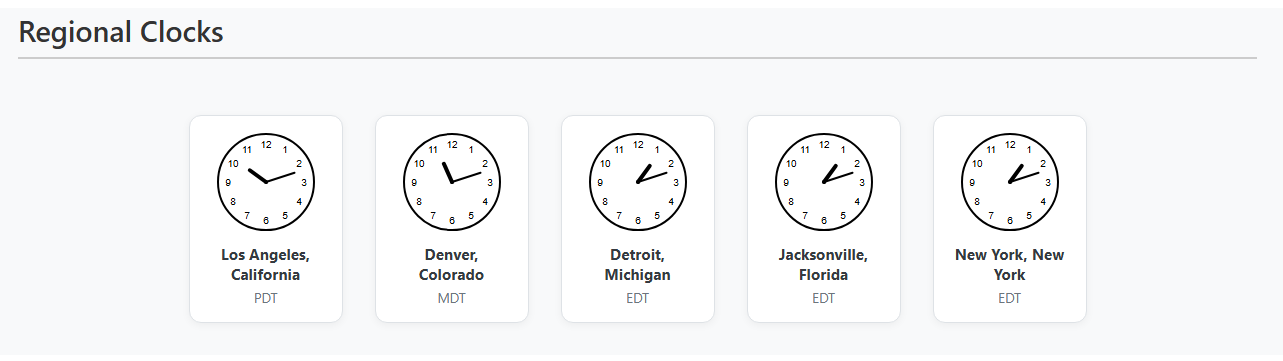
This post is your full walk-through for designing, building, and optimizing a beautiful, SVG-based, auto-updating Clock Web Part for SharePoint using SPFx. We’ll unpack everything: time zones, Daylight Saving Time, SVG rendering, JSON configuration, dynamic updates—heck, even how to make it all look good with SCSS. It’s developer-to-developer, man-to-man, keyboard-to-keyboard. So buckle in.
The Problem with Time (and SharePoint)
Time zones are like that one friend who’s always late and never texts. They’re inconsistent, they shift (looking at you, Daylight Saving), and JavaScript doesn’t exactly help. SharePoint, bless its bureaucratic heart, doesn’t offer a great out-of-the-box solution for visual clocks that respect global time zones.
Sure, you could slap in some iframe from a third-party widget, but that’s like duct-taping a wall clock to your server room door—ugly, insecure, and absolutely not scalable.
So, we build. We use SPFx to roll our own clocks that are:
- Visually appealing (SVG)
- Time zone aware
- Respectful of Daylight Saving Time
- Configurable via JSON
- Auto-updating
Let’s Start at the Beginning: Planning the Clock
Before you even touch a line of code, you need a clear plan. Our goal was simple: allow developers to embed regional clocks in SharePoint using configurable JSON. No web service dependencies, no user tracking, no fluff. Just lean, mean, SVG time machines.
Each clock represents a location defined by:
- Location name
- Timezone (IANA format, e.g., “America/New_York”)
- Optional label override
We’d sort them from earliest to latest (based on the local time) and show no more than five—unless you want more, in which case, we got you covered.
Setting Up the SPFx Environment
You probably already know the drill, but for posterity’s sake:
- Yeoman generator for SPFx (
@microsoft/generator-sharepoint) - React as your framework
- Web Part type project
- Select
ReactandNo JavaScript Framework(if you hate yourself)
Once you’ve got the shell, it’s time to carve it up.
Defining Props and JSON Structure
We created a Prop called clocksJSON. That’s right—developers configure clocks by pasting a simple JSON string in the property pane. A typical entry looks like this:
[
  {"location":"Los Angeles, California","timezone":"America/Los_Angeles","label":""},
  {"location":"New York, New York","timezone":"America/New_York","label":""}
]
We parse this JSON, validate entries, and use it to render our clocks. This structure keeps it flexible while remaining idiot-proof.
Calculating Time in Other Zones
Now comes the magic. You want the clock to show the current time in Tokyo, right now, in the correct DST-adjusted format. That’s where Intl.DateTimeFormat comes in. It handles time zones natively.
const formatter = new Intl.DateTimeFormat('en-US', { timeZone: tz, timeZoneName: 'short' });Then, to get the offset label (like EDT vs EST), we parse the formatted parts using formatToParts(). That’s your real-time zone label—accurate, clean, and automatic.
We built a helper called getTimeInZone that returns a Date object for a given IANA timezone. It’s elegant, simple, and works in modern browsers.
Drawing SVG Clocks (Like a Pro)
Each clock is pure SVG. No canvas, no images. Just crisp, scalable vector graphics that render cleanly across all resolutions. We calculate angles for hour and minute hands, drop in the 1-12 numerals, and animate it using simple re-renders every minute.
The SVG looks sharp, loads fast, and because it’s pure JSX, it plays nice with React. Rendering 5 clocks on a page? No problem. This thing runs smoother than a freshly oiled server rack.
Making It Tick (Literally)
Your clocks are only as good as your updates. We added an setInterval hook that ticks every minute, updating the state so the SVG redraws.
React’s useEffect() handles mounting and unmounting like a champ. No memory leaks, no stale data. Just clean, regular updates, exactly when you need them.
This approach is more efficient than trying to animate every second. It also aligns nicely with business use-cases—this isn’t a stopwatch. We care about accurate minute-by-minute time.
Limiting the Number of Clocks (Or Not)
We originally set a five-clock limit because, let’s face it, SharePoint pages don’t need to become Times Square. But you can remove that limit by changing or commenting out the slice operation on the array before render.
Want 10 clocks? Go wild. Just remember, each one ticks every minute, so your re-renders can add up. Monitor performance if you crank it to 50+.
Styling with SCSS
We used CSS modules (Clocks.module.scss) to handle styling. The core SCSS keeps the grid clean, centers the clocks, and gives a nice hover transition. The h1 title sits above the grid, styled for visual hierarchy.
The component is also wrapped in a section tag with a defined max height and vertical scroll if overflowed. This keeps your web part contained, even with a long list of time zones.
Example SCSS for the title:
h1 {
  font-size: 1.5em;
  text-align: center;
  padding-bottom: 10px;
  border-bottom: 1px solid #ccc;
  margin-bottom: 20px;
}
Accessibility and Semantics
Each clock SVG includes aria-label attributes so screen readers can describe the time. This isn’t just about ticking boxes—it’s about making SharePoint accessible to all users.
Sorting Clocks from East to West
We sort clocks based on their current time, which means you’ll see Tokyo on the left and LA on the right. Simple .sort((a, b) => a.currentTime - b.currentTime) logic makes it happen.
You could reverse the order, sort alphabetically, or even make it user-configurable. We picked logical progression: earliest to latest.
Extending the Clock Web Part
This project is built for extension. You can:
- Add digital time readouts
- Allow color or theme overrides
- Support larger or responsive SVGs
- Hook into Office 365 APIs for user-based personalization
The core logic is modular. You can swap out pieces without breaking the whole thing.
Real-World Uses
This isn’t just a dev toy. Our clients use these clocks for:
- Support desks monitoring global users
- Project managers coordinating daily standups
- HR teams syncing with regional offices
- Executives tracking overseas teams
And yeah, it just looks cool. There’s a satisfaction to seeing your own code tick along with real-world time.
Performance Considerations
We run updates every 60 seconds. That’s a good tradeoff between visual accuracy and performance. If you start rendering dozens of SVGs, profile your app. React handles it well, but don’t abuse your DOM.
Use React.memo() or pure components if needed, and always clean up your intervals.
Final Thoughts: Why This Matters
Building this Clock Web Part isn’t just about clocks. It’s about taking control of SharePoint, bending it to your will, and giving users a tool that’s actually useful.
It shows you can do clean, performant, visual rendering in SPFx. You can deal with time zones without crying. You can make SharePoint sing.
And you did it all with TypeScript, SVG, and a little JSON. No third-party APIs. No licenses. Just good, honest, hard-coded craftsmanship.
Want More?
If you made it this far, you’re my kind of dev. Subscribe to the newsletter, drop a comment with your mods, or reach out directly—let’s keep building tools that don’t suck.

Sources
- MDN Web Docs: JavaScript Date Object
- MDN Web Docs: Intl.DateTimeFormat
- CSS-Tricks: Scaling SVGs Responsively
- React Docs: Hooks Overview
- Microsoft Docs: SharePoint Framework Web Parts
- Wikipedia: List of IANA Time Zones
- Luxon Documentation
- W3C: Scalable Vector Graphics (SVG) 2
- useHooks.com: useInterval Hook
- StackOverflow: SVG Arc Calculations
- Can I Use: Intl Support
- GitHub: SPFx Yeoman Generator
- React + TypeScript Cheatsheet
- Frontend Masters Courses (especially SVG & React)
Disclaimer:
The views and opinions expressed in this post are solely those of the author. The information provided is based on personal research, experience, and understanding of the subject matter at the time of writing. Readers should consult relevant experts or authorities for specific guidance related to their unique situations.