
2,548 words, 13 minutes read time.
When it comes to cybercrime, tech support scams are among the sneakiest and most widespread threats today. These scams prey on everyday users, often catching people off guard with urgent warnings and convincing calls. If you’re interested in cybersecurity or just want to protect yourself and your digital life, learning how to identify and avoid tech support scams is absolutely crucial. This document dives deep into how these scams operate, what red flags to look for, and how to stay safe — all in a straightforward, expert-backed way.
Why Tech Support Scams Continue to Be a Massive Threat
Tech support scams have evolved into a multi-billion-dollar problem worldwide, targeting people of all ages but often focusing on less tech-savvy individuals. According to the Federal Trade Commission (FTC), tech support scams cost consumers over $150 million in reported losses annually, but the actual number is likely far higher due to underreporting. These scams exploit fear and confusion by mimicking legitimate tech companies and tricking people into giving remote access or paying for fake services.
At their core, these scams use social engineering—a psychological manipulation technique—to create a false sense of urgency and trust. Victims receive unsolicited calls or see alarming pop-ups claiming their computers are infected or compromised. Scammers then pressure victims to grant remote control or pay for unnecessary “repairs.” Microsoft’s security team warns that “the criminals behind these scams are getting smarter, using convincing scripts and even fake websites that look almost identical to real support pages”
How Tech Support Scams Usually Work
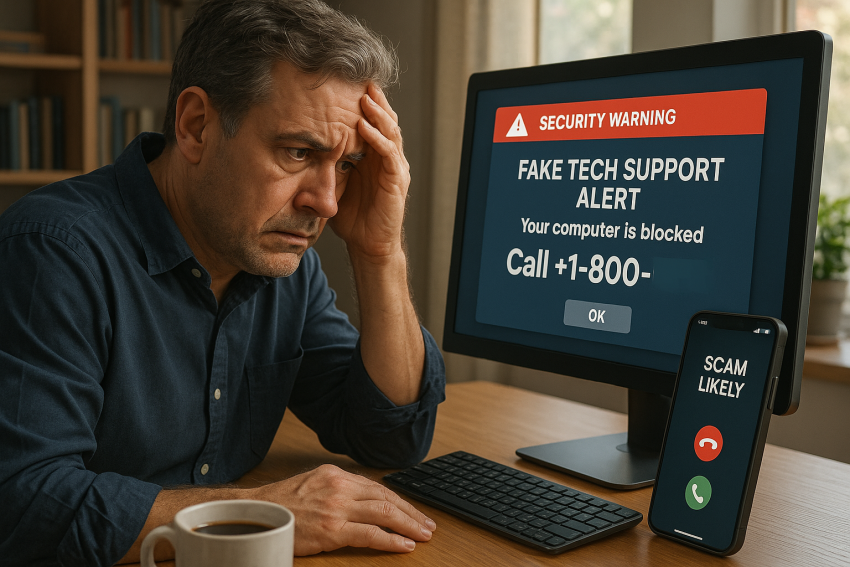
Most tech support scams start with an unexpected contact. This might be a phone call claiming to be from a well-known company like Microsoft or Apple, or an alarming pop-up warning about virus infections. The scammers often claim they have detected malware or suspicious activity on your device. Sometimes they even play prerecorded messages designed to sound urgent and official.
What makes these scams especially dangerous is their reliance on social engineering rather than technical hacking. They don’t need to breach your system initially; they rely on you letting them in by granting remote access or handing over personal information. Once inside, they might install malware, steal credentials, or charge exorbitant fees for “repairs” that never happen.
A recent advisory from the Cybersecurity and Infrastructure Security Agency (CISA) highlights that “the most effective defense is awareness—knowing how scammers operate and recognizing their common tactics”
Recognizing the Red Flags: How to Spot a Tech Support Scam
The key to avoiding tech support scams is to recognize when something isn’t right. First, legitimate tech companies rarely, if ever, call or email you unsolicited about problems with your device. If you receive a cold call warning about your computer’s health, it’s almost certainly a scam.
Another big red flag is pressure tactics. Scammers push you to act immediately, claiming your computer will be disabled, your data lost, or your identity stolen if you don’t comply. They create a false sense of urgency because they know you’re more likely to make a mistake under pressure.
Look closely at the details too. Scammers often use spoofed phone numbers or email addresses that look similar to official ones but have subtle differences. If you’re asked to download software or allow remote control, pause and verify the request independently by contacting the company directly through their official website or known support channels.
Even if the caller or pop-up sounds convincing, remember that reputable companies do not ask for payment via gift cards, wire transfers, or cryptocurrency. These are classic signs of fraud.
The FBI advises users to “always question unsolicited contacts about your technology. If in doubt, hang up and contact the company yourself” When it comes to cybercrime, tech support scams are among the sneakiest and most widespread threats today. These scams prey on everyday users, often catching people off guard with urgent warnings and convincing calls. If you’re interested in cybersecurity or just want to protect yourself and your digital life, learning how to identify and avoid tech support scams is absolutely crucial. This document dives deep into how these scams operate, what red flags to look for, and how to stay safe — all in a straightforward, expert-backed way.
Why Tech Support Scams Continue to Be a Massive Threat
Tech support scams have evolved into a multi-billion-dollar problem worldwide, targeting people of all ages but often focusing on less tech-savvy individuals. According to the Federal Trade Commission (FTC), tech support scams cost consumers over $150 million in reported losses annually, but the actual number is likely far higher due to underreporting. These scams exploit fear and confusion by mimicking legitimate tech companies and tricking people into giving remote access or paying for fake services.
At their core, these scams use social engineering—a psychological manipulation technique—to create a false sense of urgency and trust. Victims receive unsolicited calls or see alarming pop-ups claiming their computers are infected or compromised. Scammers then pressure victims to grant remote control or pay for unnecessary “repairs.” Microsoft’s security team warns that “the criminals behind these scams are getting smarter, using convincing scripts and even fake websites that look almost identical to real support pages”.
How Tech Support Scams Usually Work
Most tech support scams start with an unexpected contact. This might be a phone call claiming to be from a well-known company like Microsoft or Apple, or an alarming pop-up warning about virus infections. The scammers often claim they have detected malware or suspicious activity on your device. Sometimes they even play prerecorded messages designed to sound urgent and official.
What makes these scams especially dangerous is their reliance on social engineering rather than technical hacking. They don’t need to breach your system initially; they rely on you letting them in by granting remote access or handing over personal information. Once inside, they might install malware, steal credentials, or charge exorbitant fees for “repairs” that never happen.
A recent advisory from the Cybersecurity and Infrastructure Security Agency (CISA) highlights that “the most effective defense is awareness—knowing how scammers operate and recognizing their common tactics”
Recognizing the Red Flags: How to Spot a Tech Support Scam
The key to avoiding tech support scams is to recognize when something isn’t right. First, legitimate tech companies rarely, if ever, call or email you unsolicited about problems with your device. If you receive a cold call warning about your computer’s health, it’s almost certainly a scam.
Another big red flag is pressure tactics. Scammers push you to act immediately, claiming your computer will be disabled, your data lost, or your identity stolen if you don’t comply. They create a false sense of urgency because they know you’re more likely to make a mistake under pressure.
Look closely at the details too. Scammers often use spoofed phone numbers or email addresses that look similar to official ones but have subtle differences. If you’re asked to download software or allow remote control, pause and verify the request independently by contacting the company directly through their official website or known support channels.
Even if the caller or pop-up sounds convincing, remember that reputable companies do not ask for payment via gift cards, wire transfers, or cryptocurrency. These are classic signs of fraud.
The FBI advises users to “always question unsolicited contacts about your technology. If in doubt, hang up and contact the company yourself” (source: FBI).
Protecting Yourself from Becoming a Victim
Prevention is your best weapon. Never give remote access to anyone unless you initiated contact with a verified support provider. If you get a call from someone claiming to be tech support, don’t rely on caller ID—it can be faked. Instead, hang up and call the official support number from the company’s website.
Use strong antivirus and anti-malware programs and keep them updated regularly. These tools can block malicious downloads or pop-ups that lead to scams. Backing up your data regularly also reduces the risk of losing important files if something goes wrong.
Another simple yet powerful step is education. Stay informed about the latest scams. Follow trusted cybersecurity blogs and government advisories to understand how scammers operate. The FTC recommends “educating yourself on common scam tactics and sharing that knowledge with friends and family” (source: FTC).
Additionally, practice good cyber hygiene by using multi-factor authentication and strong passwords. If a scammer gains access to one account, these protections can prevent them from moving laterally through your other accounts.
What to Do If You Think You’ve Been Scammed
If you suspect you’ve fallen victim to a tech support scam, immediate action is essential. Disconnect your device from the internet and shut down any remote access software. Run a full malware and antivirus scan to detect and remove any threats.
Change passwords on important accounts, especially financial services, email, and social media. Monitor your bank and credit accounts closely for unauthorized transactions.
Report the scam to the appropriate authorities. The FTC has a dedicated portal for reporting fraud, and the FBI’s Internet Crime Complaint Center (IC3) collects data on these scams to help law enforcement track and combat them. According to the FTC, “reporting scams helps protect others and aids law enforcement in pursuing scammers” (source: FTC Consumer Blog).
If you’ve paid money or shared personal information, contact your bank or credit card company immediately to try to stop payments or freeze accounts.
Building a Cybersecurity Mindset: Staying One Step Ahead
Cybersecurity isn’t a one-time effort. Scammers constantly refine their tactics, which means your defenses must evolve too. Cultivating a healthy skepticism is key—question unexpected calls or pop-ups and verify information before taking action.
Engage regularly with cybersecurity communities or follow trusted resources like Norton, Kaspersky, and Tripwire. These organizations provide up-to-date advice on emerging scams and tools to protect yourself. As Norton emphasizes, “staying informed and cautious is your best defense against social engineering attacks” (source: Norton).
Lastly, encourage your family and friends to adopt the same mindset. Many tech support scam victims are older adults or people less familiar with technology. Sharing knowledge helps create a safer digital environment for everyone.
Conclusion: Stay Alert, Stay Safe, and Stay Connected
Tech support scams are a persistent threat in today’s digital world, but they can be defeated with awareness, vigilance, and smart cybersecurity habits. By recognizing the signs of a scam, protecting your devices and data, and responding quickly if you fall victim, you can keep scammers at bay.
Remember, no legitimate company will ever pressure you into giving remote access or paying unexpectedly. When in doubt, always verify independently.
If you found this guide helpful, subscribe to our newsletter for the latest cybersecurity tips and insights. Got a story or questions about tech support scams? Join the conversation by leaving a comment below. Let’s work together to outsmart scammers and protect our digital lives.
Protecting Yourself from Becoming a Victim
Prevention is your best weapon. Never give remote access to anyone unless you initiated contact with a verified support provider. If you get a call from someone claiming to be tech support, don’t rely on caller ID—it can be faked. Instead, hang up and call the official support number from the company’s website.
Use strong antivirus and anti-malware programs and keep them updated regularly. These tools can block malicious downloads or pop-ups that lead to scams. Backing up your data regularly also reduces the risk of losing important files if something goes wrong.
Another simple yet powerful step is education. Stay informed about the latest scams. Follow trusted cybersecurity blogs and government advisories to understand how scammers operate. The FTC recommends “educating yourself on common scam tactics and sharing that knowledge with friends and family”.
Additionally, practice good cyber hygiene by using multi-factor authentication and strong passwords. If a scammer gains access to one account, these protections can prevent them from moving laterally through your other accounts.
What to Do If You Think You’ve Been Scammed
If you suspect you’ve fallen victim to a tech support scam, immediate action is essential. Disconnect your device from the internet and shut down any remote access software. Run a full malware and antivirus scan to detect and remove any threats.
Change passwords on important accounts, especially financial services, email, and social media. Monitor your bank and credit accounts closely for unauthorized transactions.
Report the scam to the appropriate authorities. The FTC has a dedicated portal for reporting fraud, and the FBI’s Internet Crime Complaint Center (IC3) collects data on these scams to help law enforcement track and combat them. According to the FTC, “reporting scams helps protect others and aids law enforcement in pursuing scammers”.
If you’ve paid money or shared personal information, contact your bank or credit card company immediately to try to stop payments or freeze accounts.
Building a Cybersecurity Mindset: Staying One Step Ahead
Cybersecurity isn’t a one-time effort. Scammers constantly refine their tactics, which means your defenses must evolve too. Cultivating a healthy skepticism is key—question unexpected calls or pop-ups and verify information before taking action.
Engage regularly with cybersecurity communities or follow trusted resources like Norton, Kaspersky, and Tripwire. These organizations provide up-to-date advice on emerging scams and tools to protect yourself. As Norton emphasizes, “staying informed and cautious is your best defense against social engineering attacks”.
Lastly, encourage your family and friends to adopt the same mindset. Many tech support scam victims are older adults or people less familiar with technology. Sharing knowledge helps create a safer digital environment for everyone.
Conclusion: Stay Alert, Stay Safe, and Stay Connected
Tech support scams are a persistent threat in today’s digital world, but they can be defeated with awareness, vigilance, and smart cybersecurity habits. By recognizing the signs of a scam, protecting your devices and data, and responding quickly if you fall victim, you can keep scammers at bay.
Remember, no legitimate company will ever pressure you into giving remote access or paying unexpectedly. When in doubt, always verify independently.
If you found this guide helpful, subscribe to our newsletter for the latest cybersecurity tips and insights. Got a story or questions about tech support scams? Join the conversation by leaving a comment below. Let’s work together to outsmart scammers and protect our digital lives.

Sources
- FTC: How to Recognize and Avoid Tech Support Scams
- Microsoft Security Blog: Spotting and Stopping Tech Support Scams
- CISA: Warnings and Protection Tips Against Tech Support Scams
- FBI: Tech Support Scams
- Consumer Reports: How to Avoid Tech Support Scams
- Norton: What Are Tech Support Scams & How to Avoid Them
- Tripwire: Understanding Tech Support Scams
- US-CERT: Tech Support Scams — How to Avoid Them
- FTC Consumer Blog: Tech Support Scams – How to Spot and Avoid Them
- Kaspersky: What Are Tech Support Scams & How to Protect Yourself
- CyberScoop: How Tech Support Scams Work & How to Avoid Them
- Avast: What Are Tech Support Scams?
- eSecurity Planet: What Is a Tech Support Scam?
- TechRadar: How to Avoid Tech Support Scams
- ZDNet: How to Spot and Avoid Tech Support Scams
Disclaimer:
The views and opinions expressed in this post are solely those of the author. The information provided is based on personal research, experience, and understanding of the subject matter at the time of writing. Readers should consult relevant experts or authorities for specific guidance related to their unique situations.