
460 words, 2 minutes read time.
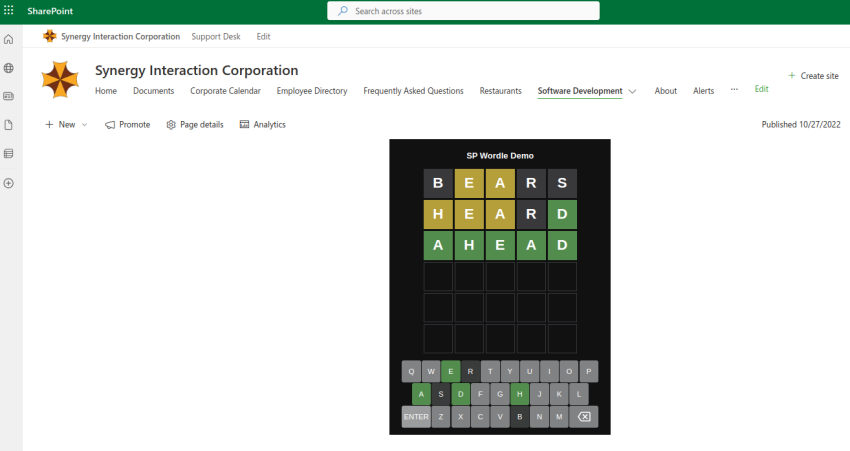
A few years ago, I embarked on an exciting project to build a Wordle clone as a SharePoint Framework (SPFx) web part. This project was not just about recreating a popular game but also about demonstrating the flexibility and power of SPFx in creating custom SharePoint solutions. In this blog post, I’ll share some code samples and showcase how SPFx can be used to build interactive and engaging web parts.
Project Overview
Wordle is a word puzzle game where players have six attempts to guess a five-letter word. Each guess provides feedback on the correctness and position of the letters. My goal was to recreate this experience within a SharePoint site, leveraging SPFx to build a functional and visually appealing web part.
Key Features
- Interactive Gameplay: Players can guess words using both an on-screen keyboard and physical keyboard inputs.
- Real-Time Feedback: The game provides immediate visual feedback on guesses.
- Custom Alerts: Notifications for game outcomes and errors are displayed dynamically.
Code Highlights
React Component: Wordle.tsx
The core of the web part is the Wordle React component. This component handles user interactions, game logic, and state management. Here are some key parts of the code:
Initialization and Event Handling:
public componentDidMount() {
    keyboard = document.querySelector("[data-keyboard]");
    alertContainer = document.querySelector("[data-alert-container]");
    guessGrid = document.querySelector("[data-guess-grid]");
    this.startInteraction();
}

private startInteraction = () => {
    document.addEventListener("click", this.handleMouseClick);
    document.addEventListener("keydown", this.handleKeyPress);
}
Handling User Input:
private handleMouseClick = (e) => {
    e.preventDefault();
    if (e.target.matches("[data-key]")) {
        this.pressKey(e.target.dataset.key);
        return;
    }
    if (e.target.matches("[data-enter]")) {
        this.submitGuess();
        return;
    }
    if (e.target.matches("[data-delete]")) {
        this.deleteKey();
        return;
    }
}

private handleKeyPress = (e) => {
    e.preventDefault();
    if (e.key === "Enter") {
        this.submitGuess();
        return;
    }
    if (e.key === "Backspace" || e.key === "Delete") {
        this.deleteKey();
        return;
    }
    if (e.key.match(/^[a-z]$/)) {
        this.pressKey(e.key);
        return;
    }
}
SCSS Styles: Wordle.module.scss
The SCSS file styles the web part, ensuring it looks as good as it functions. Here’s how it’s done:
Grid Layouts:
.keyboard {
    display: grid;
    grid-template-columns: repeat(20, minmax(auto, 1.25em));
    grid-auto-rows: 3em;
    gap: .1em;
    justify-content: center;
}

.guessGrid {
    display: grid;
    justify-content: center;
    align-content: center;
    grid-template-columns: repeat(5, 4em);
    grid-template-rows: repeat(6, 4em);
    gap: .25em;
    margin-bottom: 1em;
}
Tile Styles and Animations:
.tile[data-state="correct"] {
    border: none;
    background-color: hsl(115, 29%, 43%);
}

@keyframes shake {
    10% { transform: translateX(-5%); }
    30% { transform: translateX(5%); }
    // More keyframes...
}
Showcasing SPFx Capabilities
This project demonstrates the power and flexibility of SharePoint Framework (SPFx) in several ways:
- Custom Web Parts: SPFx allows for the creation of fully customized web parts that can integrate seamlessly with SharePoint sites.
- Rich User Interfaces: Using React and SCSS, you can build interactive and visually appealing web parts.
- Event Handling: SPFx supports sophisticated event handling, enabling responsive and engaging user interactions.
Conclusion
Building a Wordle clone as a SharePoint web part was both a challenging and rewarding experience. This project not only provided an opportunity to explore the capabilities of SPFx but also demonstrated how SharePoint can be used to deliver interactive and custom solutions. If you’re interested in developing SharePoint solutions, I encourage you to explore SPFx and see what innovative projects you can create!
