
1,009 words, 5 minutes read time.
If you’re into 3D printing, you know the thrill of designing and printing custom solutions for just about anything. Whether you’re creating functional objects or intricate models, the ability to customize designs is a massive benefit. Now, imagine a tool that allows you to quickly design custom storage solutions in mere seconds. Meet Bento3D, an innovative and free tool that takes the guesswork out of 3D design, helping you to create organizational containers tailored to your needs. This blog is based on a fantastic video that breaks down exactly how Bento3D works.
What Is Bento3D?
Bento3D is a web-based design tool aimed at making the creation of organizational storage systems as simple as possible. Whether you need a box to organize your desk items, kitchen utensils, or even something as niche as Taco Bell sauce packets (as demonstrated in the video), Bento3D allows you to custom-design these boxes without having any prior design skills. The best part? It’s completely free and offers downloadable STL files that are ready to be sent to your 3D printer.
What sets Bento3D apart from other 3D design tools is how quick and intuitive it is to use. By simply inputting dimensions and clicking a few buttons, you can create complex, functional boxes in minutes. Whether you’re new to 3D printing or a seasoned pro, Bento3D makes life easier by handling the heavy lifting in design.
Why 3D Printing Enthusiasts Should Care About Bento3D
If you’re someone who already understands the beauty and functionality of 3D printing, you know that time and precision are essential. Designing a custom storage solution from scratch can be time-consuming, and that’s where Bento3D excels. This tool is perfect for:
- Quick Prototyping: Bento3D allows you to test out storage solutions with ease. With just a few clicks, you can define the depth, width, and height of a container, and the software automatically adjusts the box’s overall structure.
- Functional Design: Need something more specific, like dividers or compartments? Bento3D has a feature that lets you add internal spacers to your design, ensuring that you can organize various objects (from screws to utensils) without clutter.
- User-Friendly Interface: One of the standout features is its intuitive interface. With just a left mouse click or touch (yes, it works on mobile too), you can drag to adjust your box’s dimensions. For anyone who isn’t already familiar with design software like CAD, this simplicity is refreshing.
How Bento3D Works
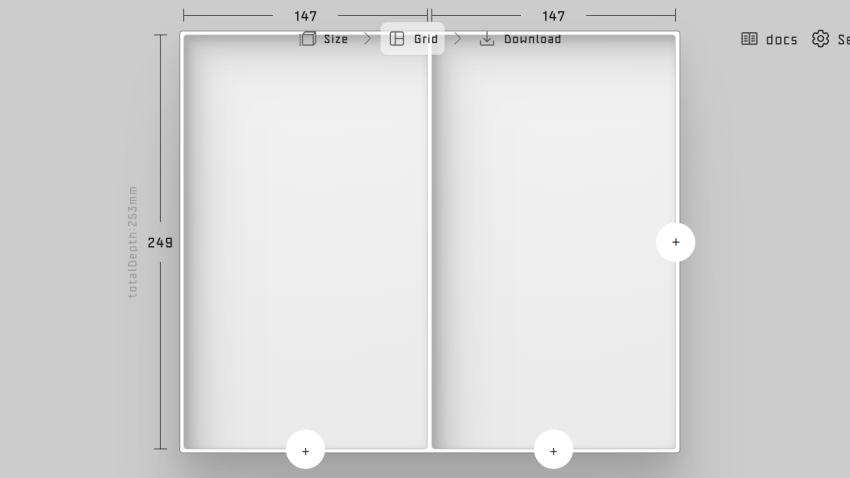
The core of Bento3D’s simplicity lies in its minimalist interface. You begin by defining the dimensions of the box you want to create. For instance, the video walks you through the design of a storage box for Taco Bell sauce packets. By inputting measurements—like 140mm for width and 85mm for depth—you’re already on your way to creating a perfectly-sized container.
Once your dimensions are set, you can break down your box into columns and even insert dividers or spacers. Need a box with three compartments to keep fire, mild, and hot sauce packets separate? Bento3D makes it possible in seconds.
Key Features of Bento3D
Here are a few standout features that make Bento3D an invaluable tool for 3D printing enthusiasts:
- Customizable Dimensions: You can control the width, depth, and height of the box, making it adaptable to any storage needs.
- Columns and Spacers: With the ability to add columns and spacers, you can compartmentalize your box for better organization.
- STL File Generation: Once your design is complete, Bento3D allows you to download an STL file, ready for 3D printing.
- External Case and Lid: Bento3D doesn’t just design internal boxes. You can also create an external case, complete with a lid and clasp, ensuring that whatever you store is safe and secure.
- Hardware Compatibility: The tool provides options to add hinges and clasps using standard M2 screws and pins, making assembly straightforward and hassle-free.
Real-World Applications of Bento3D
The flexibility of Bento3D makes it ideal for various projects, whether you’re organizing craft supplies, storing nuts and bolts, or designing drawer organizers. Here are just a few ideas of how you can use this tool:
- Kitchen Drawer Dividers: Organize your silverware, spices, or other kitchen items by creating custom-fit dividers for your drawers.
- Office Supplies: Use Bento3D to design boxes that will neatly store paper clips, sticky notes, pens, and other office essentials.
- Garage Organization: Whether you need containers for screws, nails, or small tools, Bento3D allows you to create specific solutions that fit right into your toolbox or workbench.
- Hobbyist Projects: For those who enjoy DIY or arts and crafts, Bento3D offers the ability to design storage solutions for everything from buttons to beads.
Printing Tips for Bento3D Designs
While Bento3D simplifies the design process, it’s important to remember a few printing best practices to ensure that your models come out perfectly:
- Follow Print Orientation Recommendations: Bento3D provides orientation guidelines in its documentation. For example, printing a box lid with its hinge side down and adding supports can ensure a smooth finish.
- Repair Models If Necessary: Occasionally, your slicer may flag issues with geometry. Bento3D STL files are usually well-formed, but if errors occur, use tools like PrusaSlicer or MeshMixer to repair the files.
- Material Considerations: PLA is a fantastic material for most Bento3D projects, as it’s strong and easy to print. However, if you need something more durable or heat-resistant, you may want to experiment with PETG or ABS.
Final Thoughts: Bento3D is a Game Changer for 3D Printing
If you’re looking for a way to quickly design and print custom organizational solutions, Bento3D is a tool you can’t afford to miss. It’s free, incredibly easy to use, and takes the pain out of designing from scratch. Whether you’re a hobbyist or a professional, Bento3D adds value to your workflow by letting you focus on printing practical solutions without wasting time on complex designs.
So, why not give it a try? If you do create something amazing using Bento3D, be sure to share it online and tag the creator. Who knows—you might just inspire the next wave of 3D printed storage innovations!
