
1,093 words, 6 minutes read time.
If you’re a guy who treats his 3D printer like a precision tool, nothing grinds your gears more than a print fused to the build plate like it’s welded on. You’ve finished a long session, lean in, and the print refuses to budge. It’s like your favorite wrench suddenly won’t fit the bolt. The good news? Whether you’re using standard resin or water-washable resin, freeing your prints doesn’t have to feel like demolition. With the right knowledge, a few battle-tested tools, and some finesse, you can safely separate your models without ruining the plate, the print, or your sanity.
Why Resin Prints Stick So Damn Well
First, understand the enemy. Resin sticks aggressively because of a mix of physics and exposure settings. Thermal expansion plays a role — heat makes the metal expand and squeeze the cured resin tighter. Overexposure in the bottom layers causes a thicker, harder “burn-in” that’s practically glued to the plate. Suction is another culprit: large, flat surfaces act like a vacuum, making removal feel impossible. Even water-washable resins exhibit this clinginess, so knowing why prints stick helps you approach extraction with patience instead of brute force.
Safety First: Gear Up Before You Pry
Gloves aren’t optional — even water-washable resin can irritate skin before curing. Nitrile gloves, eye protection, and a well-ventilated workspace are musts. Lay down a silicone mat or tray to catch drips. Yes, water-washable resin can be rinsed with tap water, but spills on surfaces still create a mess, and uncured resin is still messy and potentially harmful.
The Best Tools for Extraction
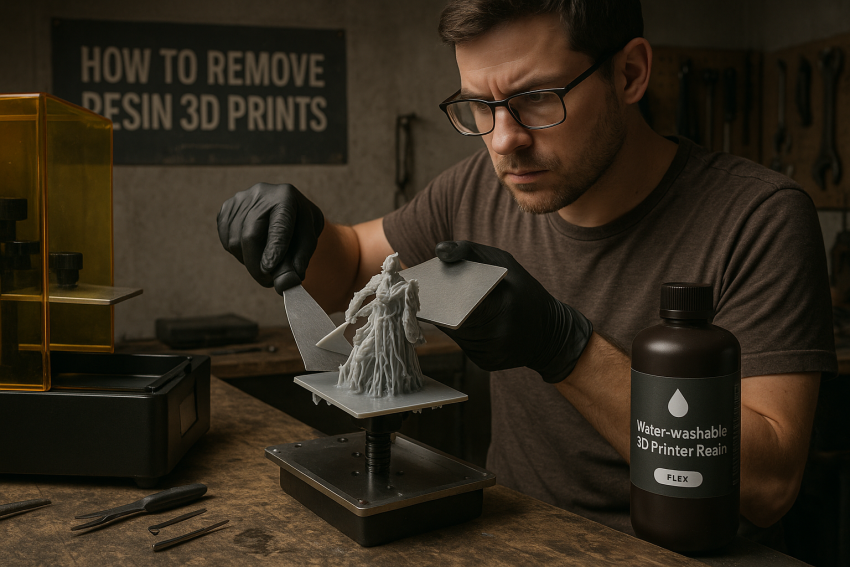
You need the right weapons. A metal scraper, preferably angled, is your main tool. Razor blades or utility knives help with stubborn edges but demand respect — one slip can ruin a model or hurt you. Plastic scrapers are perfect for delicate surfaces or water-washable prints to avoid scratching the plate. Think of it like loosening a rusted bolt: leverage matters more than brute force.
Techniques to Make Prints Pop Off
After printing, tilt the build plate so excess resin drips back into the vat. Gravity is your friend. Then gently insert your scraper at a corner, wiggling instead of forcing it flat. Stubborn prints benefit from heat: hot water, a hairdryer, or a gentle warm plate can expand the metal and loosen the bond. For water-washable resin, you can even rinse the edges lightly with warm water — it softens the surface and makes the print more manageable. Slow, steady, methodical — like prying open a jammed toolbox — is far better than swinging a hammer.
Stuck Prints? Try the Slow Soak
If brute force and heat fail, soak the print base. For standard resin, high-percentage isopropyl alcohol (IPA) is best. For water-washable resin, warm water does the trick. Let the resin swell slightly and weaken, then gently slide in your scraper and lift. Patience pays off — rushing this step risks chipping or snapping your print.
Post-Removal Plate Cleanup
Freeing the print isn’t the end. Inspect the build plate for tiny cured resin bits and residue. Scrape them off carefully, then wipe the plate clean. For water-washable resins, a quick water rinse can remove residual stickiness; for standard resins, IPA or ethanol works best. Regular maintenance prevents future sticking and ensures consistent adhesion.
Tuning Your Settings to Prevent Over-Sticking
Prevention is better than battle damage. Reduce bottom-layer exposure to prevent excessive sticking. Use rafts or angle your first layers to reduce surface contact. Consider a flex or textured build plate — bending it slightly after printing often pops prints off effortlessly. These tweaks work for both standard and water-washable resins, saving time and frustration.
Safety Reminders & Risk Management
Don’t be a hero — never point scrapers toward your body. Dispose of used IPA safely, and cure any waste before throwing it away. For water-washable resins, avoid dumping resin-heavy rinse water into drains; it’s still chemically active until fully cured. Inspect your FEP film and build plate regularly — leaving cured bits on them repeatedly shortens their lifespan and risks ruining future prints. A little diligence goes a long way in keeping your prints perfect and your fingers intact.
Real-World Tips from the Trenches
Other printers swear by flex plates — a small investment that makes removal painless. Lowering burn-in exposure and using a plastic putty scraper is another method that consistently works. Whether you’re on standard or water-washable resin, these are battle-tested solutions that will save hours of frustration and keep your prints looking sharp.
Conclusion
Removing resin prints from a build plate doesn’t have to feel like a brutal fight. With the right tools, careful technique, and a bit of patience, you can separate prints cleanly without damaging the model or the plate. Understanding why prints stick, using the proper extraction methods, and fine-tuning your exposure and plate settings will save frustration, protect your equipment, and keep every print looking sharp — whether you’re working with standard resin or water-washable formulas. Mastering these steps turns a once-dreaded part of printing into a predictable, manageable process.
Call to Action
If this post sparked your creativity, don’t just scroll past. Join the community of makers and tinkerers—people turning ideas into reality with 3D printing. Subscribe for more 3D printing guides and projects, drop a comment sharing what you’re printing, or reach out and tell me about your latest project. Let’s build together.

Sources
- Phrozen Help Center — Removing Prints From the Build Plate
- Phrozen Help Center — How to Remove the Cured Resin Stuck on the FEP Film
- Raise3D — How to Clean Resin Prints (Safety, IPA, Disposal)
- Instructables — Tools to Remove Support Structures and Rinse 3D Resin Objects
- Liqcreate — Post-Process Guide for SLA / DLP / LCD Resin Prints
- Polymaker Wiki — Resin Printing Basics & Build-Plate Removal
- 3DPrinterly — 12 Ways to Fix Resin Print Peeling From the Build Plate
- 3DPrinterly — How to Remove Resin Prints from the Build-Plate
- Tom’s Hardware — How to Clean and Cure Resin 3D Prints (Safety, IPA Baths)
- 3DPrinter Australia — Resin Prints Stuck to Build Plate? Here’s the Fix
- Anycubic Blog — How to Easily Remove a Resin Print Stuck on the Build Plate
- MIT EHS — 3D Printer Safety: Safe Removal from Build Plates
- Planmeca Creo Manual — Removing Prints from Build Platform and Cleaning
- Nedform BV — Preventing Cure Inhibition & Post Processing (Manual)
- Reddit Community — User Tips on Stuck Prints and Flex Plates
Disclaimer:
The views and opinions expressed in this post are solely those of the author. The information provided is based on personal research, experience, and understanding of the subject matter at the time of writing. Readers should consult relevant experts or authorities for specific guidance related to their unique situations.