
1,963 words, 10 minutes read time.
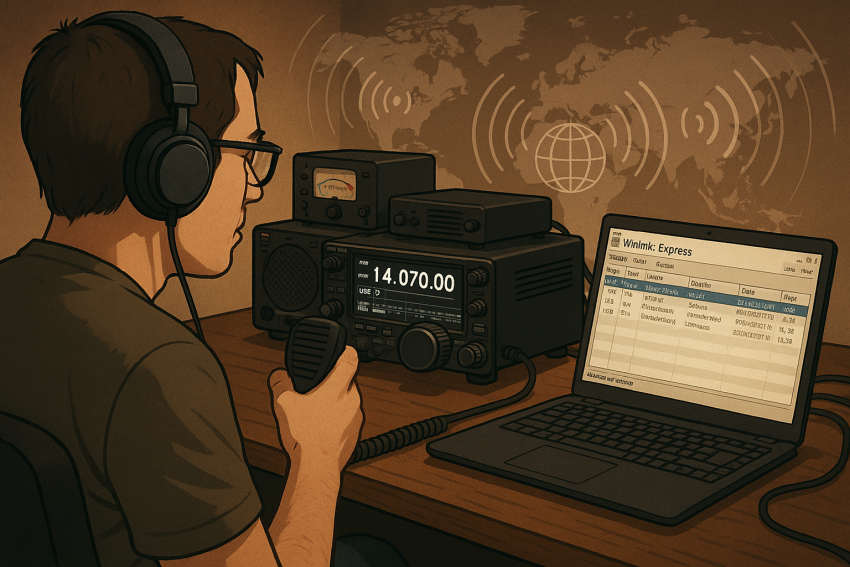
For those stepping into the world of amateur radio, discovering the ways digital technology enhances traditional communication is an exciting milestone. One of the most powerful tools available today is Winlink, a global digital messaging system that has transformed how hams connect when the internet is unavailable or unreliable. If you’re a guy interested in amateur radio and curious about how to send emails over the airwaves—without relying on conventional internet access—then this guide is for you. I’ll walk you through the what, why, and how of Winlink, and show you why it’s a critical skill to add to your toolbox on the path to becoming a well-rounded operator.
The Promise of Digital Messaging in Amateur Radio
Amateur radio has always been about pushing boundaries, from bouncing signals off the ionosphere to relaying messages during emergencies. Digital communication modes extend those capabilities beyond voice and Morse code, offering reliable, text-based connections with greater efficiency and clarity. Winlink stands out as a global solution that blends radio waves and internet gateways to allow email exchanges virtually anywhere on Earth—even in the most remote, off-grid locations.
As Bob McCreadie, K3NT, an expert in emergency communications, once explained, “Winlink is a game-changer for hams who want to provide critical messaging services during disasters or just enjoy the convenience of radio email in their daily operating.” This is a system built not only for hobbyists but also for public service operators and emergency responders who need dependable, worldwide messaging capabilities.
What Is Winlink?
At its core, Winlink is a worldwide radio email system. Unlike traditional internet email that depends on infrastructure like fiber optic cables and Wi-Fi hotspots, Winlink uses amateur radio frequencies to connect users to a network of radio stations known as RMS (Radio Message Servers). These servers act as gateways to the internet, forwarding messages back and forth between the radio user and standard email services.
The history of Winlink dates back to the 1990s when the amateur community sought more robust methods to transmit data. Originally developed by visionary amateur radio operators aiming to support maritime communication and emergency response, the system has grown into an international network serving thousands of users every day. It’s this legacy of innovation and public service that gives Winlink a special place in the modern ham radio landscape.
Unlike voice or Morse code transmissions, Winlink handles email messages, attachments, and even form-based traffic efficiently and securely over the airwaves. This allows operators to send messages that look like typical emails but are transmitted via radio waves. The beauty lies in its ability to reach recipients around the world, regardless of local internet conditions.
How Does Winlink Work?
Understanding the mechanics of Winlink requires a grasp of how radio waves and internet services intersect. When you compose an email on your computer using Winlink software—most commonly Winlink Express—your message is encoded and transmitted over a radio frequency to the nearest RMS station. The RMS server then bridges that message to the internet, sending it on to the recipient’s email address.
Winlink supports several radio bands and modes for this process, including HF (high frequency), VHF (very high frequency), and UHF (ultra high frequency), as well as direct internet connections when available. HF allows communication over vast distances by bouncing signals off the ionosphere, ideal for global reach. VHF and UHF, on the other hand, are often used for regional or local communications, utilizing nearby RMS stations or digipeaters.
One of the most remarkable technical features of Winlink is its flexibility in modes of operation. HF operators often use PACTOR or VARA modes—specialized digital protocols optimized for error correction and reliable data transfer over noisy radio channels. On VHF and UHF, packet radio and WINMOR modes are popular. This multi-modal capability ensures that regardless of your equipment or location, there’s a way to plug into the network.
From the user’s perspective, the experience is much like sending a regular email. Winlink Express provides an interface resembling a standard email client but tailored for radio use. It manages the technical details in the background, including signal modulation and error correction, so you can focus on composing and reading messages.
Key Features and Benefits of Winlink
What makes Winlink stand out is not just its global reach but its resilience and versatility. This system shines brightest when conventional communication networks fail or do not exist. In disaster zones where internet and cellular networks collapse, Winlink keeps the lines open for emergency responders and amateur operators providing vital information.
Winlink’s integration with standard email systems is a major advantage. Messages sent through Winlink can be received by anyone on the internet, and replies come back seamlessly, bridging the gap between radio operators and internet users. This interoperability allows hams to communicate with family, friends, or agencies without requiring the recipient to have specialized equipment.
Security is another cornerstone of Winlink. The system employs authentication methods and encryption to prevent unauthorized use and protect sensitive information. Operators must register their callsigns, ensuring accountability and trustworthiness within the network. These measures make Winlink reliable for both casual use and critical messaging.
Beyond emergencies, Winlink offers a convenient way to participate in nets, coordinate events, or send routine messages without incurring cellular costs or relying on spotty internet. Many hams enjoy the challenge of mastering digital communication protocols and appreciate the ability to connect worldwide, from their home station or while portable in the field.
Setting Up Your Station for Winlink
Getting started with Winlink might seem daunting, but setting up a basic station is straightforward with the right components and guidance. First, you’ll need a transceiver capable of operating on the bands where Winlink operates—usually HF for long-distance email, or VHF/UHF for local communications. Most modern HF radios support the necessary digital modes, and some even have built-in interfaces to simplify digital connections.
A computer running Windows, macOS, or Linux is essential for installing Winlink Express, the primary client software. This program handles composing, sending, receiving, and managing emails over radio frequencies. You’ll also require an interface to connect your radio to the computer. This can be a simple sound card interface or a specialized TNC (Terminal Node Controller) device that manages digital signals.
The setup process includes registering your amateur radio callsign with the Winlink system to obtain your email address—formatted like callsign [at] winlink [dot] org—and configuring the software to match your radio’s capabilities and frequencies. The Winlink Express user guide offers step-by-step instructions, and numerous YouTube tutorials walk through the process in practical detail.
It’s also advisable to experiment with local RMS stations and test sending and receiving messages before relying on Winlink in real-world situations. Participating in Winlink nets and practice sessions builds confidence and sharpens operational skills.
Practical Applications of Winlink
The versatility of Winlink makes it an indispensable tool for a variety of use cases within the amateur community and beyond. In emergency communications, Winlink’s ability to relay messages where cell towers and internet connections fail is a lifeline. During hurricanes, wildfires, or floods, volunteer operators use Winlink to pass official information between shelters, incident command centers, and relief organizations.
Maritime operators rely on Winlink to send and receive emails while at sea, where traditional internet access is nonexistent or prohibitively expensive. This capability ensures safety and connection to the outside world for sailors navigating vast oceans.
Remote expeditions and adventurers also benefit from Winlink’s global reach. When backpacking, camping, or operating from isolated locations, hams can maintain communication for safety and coordination, using only a modest portable station and a laptop or tablet.
Winlink also enhances routine ham radio operations by supporting message nets, contest exchanges, and social communication. Its ability to handle attachments and forms adds a layer of professionalism and convenience that voice or Morse can’t match, especially when precise or lengthy information must be shared.
Learning to Use Winlink Effectively
For new users, the key to mastering Winlink is practice and engagement with the community. The system’s technical complexity can be intimidating at first, but patience and persistence pay off. Start by reading the Winlink FAQ and user manuals, then move on to hands-on experimentation with your station.
Participate in regular Winlink nets, where operators gather to exchange messages and support one another’s learning. Many amateur radio clubs and emergency communications groups offer training sessions or workshops focused on Winlink operation.
Online forums and social media groups provide valuable peer support, troubleshooting advice, and tips. Following seasoned operators who share their experiences can accelerate your learning curve and expose you to advanced techniques.
Remember, becoming proficient with Winlink not only enhances your technical skills but also deepens your connection to the wider ham radio community. It’s a skillset that pays dividends in both everyday enjoyment and critical public service.
Challenges and Considerations
While Winlink offers extraordinary capabilities, it’s not without challenges. Propagation conditions, interference, and equipment limitations can affect message delivery and quality. HF bands, for instance, depend on atmospheric conditions that vary by time of day, solar activity, and season. Patience and adaptability are essential traits for any digital mode operator.
Regulatory compliance is crucial. Winlink operators must adhere to amateur radio rules, including authorized frequencies and transmission modes. Certain types of content and message traffic are restricted by regulation, so understanding what’s permitted is vital to staying on the right side of the law.
Technical troubleshooting—such as diagnosing connection failures or adjusting interface settings—may require a willingness to dive deeper into radio electronics and software configuration. But this is part of the rewarding learning process that builds expertise.
Embracing Winlink on Your Ham Radio Journey
Winlink represents a powerful fusion of tradition and innovation in amateur radio. For men looking to expand their skills and embrace the cutting edge of radio communications, it offers a pathway to global connectivity that transcends conventional limits. Whether for emergency preparedness, maritime adventure, or simply expanding your operating horizons, mastering Winlink will serve you well on the road to becoming a versatile and capable operator.
As veteran ham operator Bob McCreadie puts it, “Winlink isn’t just another mode; it’s a communications lifeline that every serious ham should explore.” Your journey begins with curiosity and the first email sent over the airwaves. Take the leap, experiment with Winlink, and join the growing global community pushing amateur radio into the digital age.
If you found this guide helpful, I encourage you to subscribe to our newsletter for more in-depth articles on amateur radio topics. Feel free to join the conversation by leaving your questions or experiences in the comments below. If you’re learning Winlink and need someone to send messages to, please consider contacting me. My current setup supports 2-meter packet radio or direct internet access, though I’m not equipped for HF at the moment. You can send me a Winlink message—my call is W8DBK—just remember to message me from a valid amateur radio license. Alternatively, you can reach out through the website. Let’s keep the spirit of amateur radio alive and thriving together.

Sources
- Winlink Official Website
- Winlink – Wikipedia
- ARRL: Winlink Provides Vital Digital Communication
- Winlink Express User Guide
- eHam.net: Introduction to Winlink
- RigPix: Winlink Overview
- KB6NU: Ham Radio Email over Radio with Winlink
- Ham Radio Secrets: Winlink Overview
- NF4RC: What is Winlink?
- YouTube: Winlink Beginner’s Tutorial
- ARRL: Emergency Communications Using Winlink
- Winlink FAQ
- AMSAT: What is Winlink and How to Use It
- RTL-SDR: Winlink Explained
- Digipeater: Winlink Technical Guide
Disclaimer:
The views and opinions expressed in this post are solely those of the author. The information provided is based on personal research, experience, and understanding of the subject matter at the time of writing. Readers should consult relevant experts or authorities for specific guidance related to their unique situations.